Author Topic: Can't finish loading servers + error message  (Read 751 times)

The first error after like 3 seconds of being on a server:
Quote
Blockland: Sqlite Error

Blockland could not write to cache database.

Do not run the game directly from the mounted image.

The second message, that appears right after the first one:


I just did a fresh install the other day, it worked fine, now it's doing this again out of nowhere.

Running Mac OS X 10.6.6

Does anyone know a fix to this? :C You'll notice in the picture the loading bar has fully loaded datablocks but after that it just sits there and doesn't go on to download files or anything.

Quote
Blockland: Sqlite Error

Blockland could not write to cache database.

Do not run the game directly from the mounted image.
I'm going to take a guess that you mounted the DMG instead of whatever you're supposed to do.

It's installed to applications folder, and I'm not running from a mounted DMG. I haven't started it from anywhere but the applications folder using a shortcut in my dock since i reinstalled. This error message is out of nowhere, I didn't change any settings.

You might not have permissions to write to the cache database. Give yourself them.

May I ask how to go about doing this? I've never had to do that in the 3 years I've been playing this. Seems silly that i'd have to do that now, but oh well...enlighten me please.

Go to the Applications folder in Finder. Right-click "Blockland v19". Click "Get Info". Click the tiny lock at the corner. Set all permissions to "Read and Write".

noedit:
Code: [Select]
#define SQLITE_MISUSE      21   /* Library used incorrectly */

Thanks, finally figured it out:

Double click Macintosh HD.
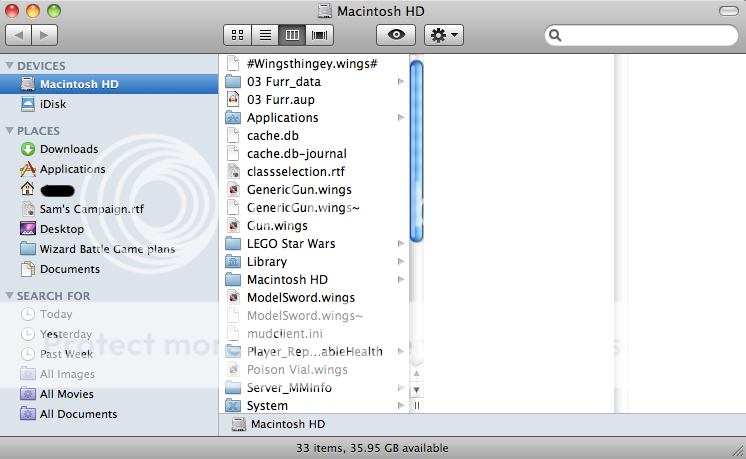

You will get your Finder.
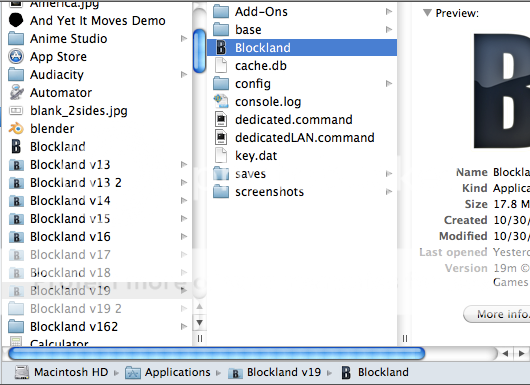

Navigate to Blockland and right-click it.
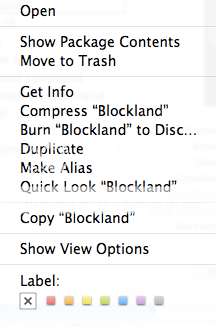

You will see this list.


Choose get info.
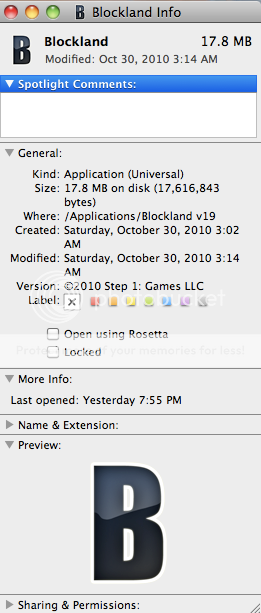

Then you get this.


Go down to "sharing and permissions".
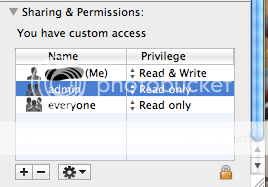

We notice that they are all "read only" except for (Me).


Click this next to "everyone".
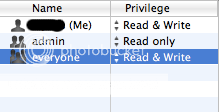

Now, you want to set it to "read and write".


Why do you have all those blockland versions?

Thanks for the in-depth guide but I'm not illiterate with mac's, in fact I specialize in mac but I've never had to deal with something like this before. I figured it would be something different than the get info tab...BUT I UNDERESTIMATED...k anyway I understood when frogger said what to do, but thanks anywho. I'll give it a try.

Still didn't work. Any other ideas? This is getting really annoying, I can't join most servers (well, i can join but I never spawn) and I can't even start Single player games because the error doesn't go away. PLEASE HELP ME I CAN'T EVEN PLAY THE GAME WITH THIS ISSUE.

Why do you have all those blockland versions?
I'm not sure. I just am too lazy to delete the older versions. I still am not sure how I have a "Version 162"..

BUMP

Come on guys, I really need help here! I can't even play the damn game with this issue! If you guys won't help me or don't know how, at least tell me who to talk to. I'm gonna go ahead and post this on RTB forums too and see if anyone there can help.

Your security software might be blocking it. You'd have to read the help for your security software yourself, however, if you want to figure out how to check that, and how to disable that.

I have no security software. I'm just using the firewall that's built into mac os x...but that actually might be the issue. I'll try disabling it completely, then I'll get back to you. Thanks doomonkey.
