Poll

x86 Or ARM?

x86
ARM

Author Topic: [MEGATHREAD] Personal Computer - Updated builds thanks to Logical Increments  (Read 1770831 times)

How do I tell if my keyboard is mechanical or membrane..?

I honestly can't figure it out.

How do I tell if my keyboard is mechanical or membrane..?

I honestly can't figure it out.

press any button, if you hear a loud click it's mechanical.

or rip a key off. if there's some flimsy plastic crap it's a membrane keyboard.

Oh, all the keyboards I've ever had/seen are mechanical then.

I can't get any of the keys off by the way.

I have this one and I can't see any way to actually grip one of the keys, I also can't wedge anything between them to get it off.

I suppose it's designed like that so you don't get things stuck in your keyboard.
« Last Edit: February 16, 2013, 04:09:53 PM by Pengie »

pretty sure that's membrane. if a keyboard doesn't explicitly state that it's mechanical (because that is a selling point) it's safe to assume membrane.

there is a good chance all of your keyboards are membrane.

So they're all just really loud membrane keyboards?

how hard are you pressing the key to hear a sound? do you feel any feedback when you press it?

there's a chance they could be mechanical but the one you linked doesn't mention it anywhere

I've probably never used a mechanical keyboard so I have nothing to compare it to.

In fact it might not be loud at all relative to a mechanical keyboard and I'd never know.

By the way, I heard some reviews say this keyboard was cheap, is £48 really cheap for a keyboard? I literally have no idea, all my keyboards have been hand me downs.

i dont like the click :c

The only real reason to buy a mechanical keyboard is for the tappy-tappy.
Which is the reason why I'm going to buy one at some point

I have an idea of what I'm going to upgrade to sometime, I'm just waiting for NewEgg to have some sales or something. Mostly because I don't badly need to upgrade right now, and I just built my PC not even a year ago - but it wouldn't hurt.

Anyways, I'm thinking of getting a GeForce GTX 660 and a Intel Core i5-3350P. I think it might be compatible with my motherboard, and fit in my case - but I'm not 100% so I just want to double check with you guys if you don't mind.

Here's my case and motherboard.

It will be compatible and it will fit

Alright, just wanted to make sure. Thanks a bunch man.

how can i go about getting all of my stuff from my old hard drives to my new ones? just hook up the hard drives with the SATA ports and then move them?

The only real reason to buy a mechanical keyboard is for the tappy-tappy.
Which is the reason why I'm going to buy one at some point
i dont like the click :c
how hard are you pressing the key to hear a sound? do you feel any feedback when you press it?

there's a chance they could be mechanical but the one you linked doesn't mention it anywhere

Not all mechanical keyboards have a loud click.

Razer just popularized the loud-ass keyboard with the BlackWidow, which had Cherry Blue switches - the loudest.


This is a rubber dome (or "membrane") key. Rubber domes are the most popular and inexpensive solution for keyboards, but they can become quite difficult to press, they can very easily gum up, and their durability does not compare at all to that of a mechanical keyboard.
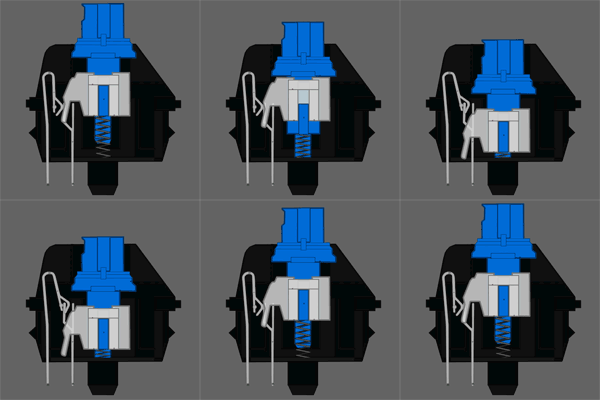


This is a cherry blue switch. It has far more tactility than other mechanical switches BUT it's also extremely loud. There are not many mech keyboards sold with Blues because of their loudness, except for the BlackWidow, and a few other brands (like Das Keyboard and Ducky).


This is a cherry red switch.  It's as quiet as a Membrane keyboard but it's very tactile, like the Blue. Reds are very popular in the gaming scene next to Blacks, Browns, and whites.


Hey what are scissor switches then?